Thursday, October 20, 2011

Quality Assurance and ROI


In the realm of software development Quality Assurance (QA) is the systematic approach to development procedures and processes which results in an end product that meets the specifications set out in the development plan. Quality Assurance is not without cost. Competitive companies have entire departments devoted entirely to QA. Having an effective QA system in place creates a sense of reliability and confidence in customers. They can trust defects will be eliminated before the final product is presented. The cost of QA then is well justified. Calculations from industry leaders indicate that the costs associated with building a product correctly the first time around are much less than the costs associated with fixing problems after delivery. In many cases, the cost can be exponentially greater to fix mistakes after the fact.
A company stands to lose great sums of money if it does not implement some form of QA during the production process. There are obviously the costs a company must undertake to correct problems once they are discovered. Those costs can be calculated but the cost of future profits lost as a result of tarnished credibility is much more difficult to quantify. According to Rex Black, president and principal consultant of RBCS, "A good (QA) team should find 85% or more of defects" saving the company in his estimation approximately $500,000 annually.
Ultimately QA is about improving a company's profitability, but the way that overall goal is accomplished is by planning, developing and testing the software at various stages to prevent bugs and the costs associated with repairing them. Bad software, full of bugs, can cost a company an almost unlimited amount. External costs such as lost sales, liability, refunds or recalls, and additional support staff to correct and support customers who are having problems all eat away at profitability. Internal costs associated with a poor or nonexistent QA system include profits lost during delays to market and time wasted by development teams fixing bugs as they arise unexpectedly. Implementing and closely following good QA standards can help avoid problems before they even arise in the first place.
Employing a detailed and functional Quality Assurance plan avoids these external and internal costs. A company with a proven record of exceptional QA is often more inclined to develop cutting edge products, perhaps beating competitors to market. This is extremely important to consider when determining profitability in all industries, but especially so in software development where technology is changing rapidly and developers must keep up with the industry's breakneck pace if they wish to stay relevant.
For more information about software quality assurance testing, visit Magenic who have been been one of the leading custom application development companies to meet unique business challenges for some of the most recognized companies and organizations in the nation.


Article Source: http://EzineArticles.com/6783727

Friday, September 9, 2011

Installing PHP and MySQL Database in Ubuntu


PHP (the acronym for PHP Hypertext Preprocessor) is a web-based programming language which has the ability to process data dynamically. PHP is said to be a server-side embedded scripting language because its syntax and commands that we provide in HTML pages or PHP pages will be fully executed by the server. Applications that are built using PHP in general will provide results on the web browser while the overall process executed on the server.
In principle, the server will work if there is a request from a client. In this case the client use URL to send a request to the server. When using PHP as a server-side embedded scripting language, the server will do the following things:
Read requests from the client / browser
Finding pages / page on the server
Perform the instructions provided by PHP to make modifications to the page / page.
Sending reload the page to the client via the internet or intranet.
Why PHP?
PHP can run on different platforms (Windows, Linux, Unix, etc.)
PHP is an open source web scripting
PHP easy to study
MySQL is a database processing program which is quite famous among web developer due to several factors or advantages:
Free license (open source), so as web developer does not need to worry about licensing issues.
Relatively small size of its data files.
Good Performance.
Easy operation with the several number of GUI (graphical user interface) based client programs make the user more easily in processing the data in mysql database systems.
The number of web hosting server support on the Internet that uses mysql as its DBMS.
Concurrent multi user, hot backups and cold backups/recovery.
To install PHP and MySQL on Ubuntu Desktop 11.10 is relatively easy. First we have to open the Synaptic Package Manager program via the menu button on the Ubuntu Unity. Then type in Synaptic and select or click on the program. Then you will be brought to the Synaptic program. If your Synaptic has not been synchronized with the Ubuntu repositories, then you must press the 'Reload' and wait a few minutes for the process of updating from the repository. After all the update process is complete, type 'php5' in the search box and then you'll be presented with a list of programs associated with php5. Look for a program called 'php5', 'php5-cli', 'php5-cgi' and 'php5-mysql' then right click on your choice and choose 'Mark for Installation'. Repeat these steps to install the program MySQL Server: 'mysql-server'. One more thing you need to do is select the program 'phpmyadmin'. This program is used to process batabase content to be used in a PHP program. After all necessary programs have been selected, click the 'Apply' button and the installation process will start soon. At the time of this installation process you will be asked to use the root password of the administrator of the MySQL database server.
For the installation php and mysql on Ubuntu Server that does not provide the program Synaptic GUI, then you can use the command line. All of the above programs can be installed using a single line of command line as follows:
prompt $ sudo apt-get install php5 php5-cli php5-cgi php5-mysql mysql-server phpmyadmin [enter]
To confirm, type Y and press enter. Then the installation process begins immediately and you will be asked what the password you'll use for the MySQL database server administrators.
After all the installation process is complete, you can try to access a MySQL database using PHPMyAdmin program. For those of you who use Ubuntu 11.10 Desktop, open the Mozilla Firefox program and access URL of localhost with subdirectory phpmyadmin address and then you will be taken to the login page MySQL database. Use the login information you created during the installation process.
For those of you who use Ubuntu 11.10 server, the easiest way to check if everything is going well is a way to access your server from another computer.Suppose your server's IP is 192.168.10.1 then use another computer, open Firefox and open URL IP Address of server with subdirectory phpmyadmin. Next you will be taken to the login page of MySQL.
That is how to install PHP and MySQL program as well as supporting applications that phpMyAdmin in Ubuntu operating system which is pretty simple.


Friday, August 12, 2011

Software Systems Architecture


Software Systems
One of the better and popular methods available today for capturing the details of an enzdvnktire architecture into a single model is by producing an array of representations of its different parts and components. This allows each component to focus on a specific facet of the system. However, the task is as difficult to do as it is to understand and you will be doomed to failure if you attempt to do it without planning your work properly. First and foremost, you must do the following: 
  • Define the main functioning elements that form your architecture
  • Describe how these functioning elements are going to interact with one another and how they will react to outside influence
  • Identify the information that the elements will present, store and manage
  • Know the hardware and software that will be needed in order to support the elements functions and information
  • Define what operating features and abilities will be provided
People are commonly tempted to answer all of the above questions with the help of a single, all-inclusive model. This typical model uses a combination of formal and colloquial notations which it uses to define the various aspects of the system. These aspects are software layering, functional structure, inter-component communication, concurrency and physical deployment environment.
Making Use of 'Views'
Complex systems need to be presented in a manner that makes them extremely user friendly, manageable and comprehensible. For that matter, a common approach used by systems developers is attacking an issue from multiple dimensions all at the same time. This is done by 'partitioning' the AD into interrelated 'views'. Specific features of the architecture are defined by each of these views and they collectively describe the entire system.
Points to Consider When Creating Views
Each 'view' represents one of the many structural aspects that make up the architecture. They help in illustrating how the entire architecture will address the concerns of the end users and stakeholders. This makes a 'view' an important aspect of the architecture. The following points must be made clear during the process of creating views: 
  • View scope: The architecture's structural aspects that you are trying to represent must be properly defined. Some examples of what structural aspects can be defined are runtime operating elements and the intercommunication between components, and the runtime environment and how the system is deployed into it.

  • Element types: The type or types of architectural elements that you are categorizing should also be defined. For instance, when deciding on the deployment of the system, you should consider whether you need individual server machines, or just a service environment that the elements of the system are deployed into.

  • Audience: The systems developer should also be able to define the class of beneficiaries that he is aiming the view at. They can either focus a view on a specific class of stakeholder, a specific person, or at a larger cluster whose members have varying interests and levels of expertise.

  • Audience expertise: Before defining views, it is essential to note down the technical skills and knowledge base of the stakeholders who will end up using the system. For instance, a novice user can barely be considered to be an expert in the field and are unlikely to have much knowledge about either hardware or software.

  • Scope of concerns: It also helps to identify what concerns of the stakeholder the specific view will serve to address. The knowledge of stakeholders on the architectural aspects and their background to these concerns should be identified.
A Little Focus on Content Goes a Long Way
As is the case with the architectural development process, when creating separate views for architecture, the main challenge of the systems developer is getting the appropriate content in the view. If you provide too much unnecessary detail and information to the audience, they will be weighed down. On the other hand, providing insufficient information will risk confusing the audience. Asking yourself two key questions when creating views helps to improve your prospects of success. The first question that needs to be asked Is whether the target stakeholders will be able to discern whether their concerns have been addressed. The second question to ask is whether will be able to successfully undertake the important role of building the system. If you think that the answer to both these questions is a unanimous 'yes', you know that have made the right choices.

Sunday, August 7, 2011

SharePoint Consulting Benefit From Significant SharePoint BI Tools


SharePoint Consulting teams depend on Microsoft Office SharePoint 2007 to help companies achieve their business objectives by capitalizing on important SharePoint BI capabilities. Every employee within an organization should be given the access to not only share and control but also reuse vital business information that is frequently circulated within the organization.
Challenges faced by Organizations
One of the major challenges faced by organizations today is to assimilate and distribute the large amount of information that is available. In order to derive maximum benefits and ensure the information serves an effective purpose, it is important to identify and the relevant data assigned to different roles in an organization. The successful implementation of SharePoint BI tools can only happen when a role-based solution has been found. Another challenge is to ensure that the right kind of information has to be made available to all the decision makers within the organization. Through the utilization of Office SharePoint Server 2007 report center, SharePoint consulting can completely change complex information into easy to understand format thereby enabling the users to make informed decisions.
The Solution: SharePoint BI
Microsoft Office SharePoint Server 2007 with its collaborative and content sharing features provides the right kind of SharePoint BI solutions. The diverse capabilities of SharePoint BI help in addressing the needs of the employees and also the need for filtering data and content.
SharePoint BI Tools
The report center serves the purpose through a centralized hub that is specifically meant for information delivery. The site for Report Center usually contains a BI portal with dashboard capabilities of SharePoint Server 2007. Site templates that are optimized for both report access and even administration is also included. For SharePoint consulting team to create a dashboard, they would require dashboard page template, which allows one to add, modify and delete various items as well as change the appearance and the look of the page. The site for Report Center is truly optimized to not only display but also create and manage dashboards.
Dashboards and its building blocks
A dashboard is a kind of customized SharePoint BI solution that employees can use to consolidate corporate, team and external information. This customized SharePoint consulting tool also offers a single-click access to different collaborative and analytical tools. As part of the SharePoint BI tools, a dashboard can help bring out information from a number of different sources and in diverse formats thereby ensuring complex information is also displayed through a simple interface. A dashboard also offers the opportunity to workers to share as well as access information required to make business decisions.
The building blocks of a dashboard within SharePoint consulting are called web parts. Asp.Net 2.0 web part is an important and main foundation for developing dashboards. SharePoint consulting team can create a range of customized web parts to suit the purpose of developing specialized SharePoint BI tools that meet the requirements of the employees. A web par can be a complex component that seamlessly integrates the existing systems with collaborative tools or it can also be a simple component depicting a user's favorite website. Despite, the functionality or the purpose web parts can play, what is important is recognizing the fact that web parts are required to build personalized dashboards, which is a major part of SharePoint BI solutions.


Thursday, July 14, 2011

App Maker Tip: How To Have an Effective Mobile App Design


Many businesses these days are developing their own mobile apps. Unfortunately, just because you are an app maker, it doesn't mean that your prospects would be eager to download your mobile application. One of the key factors to your app's success is its design. Learn below how you can have an effective mobile app design:
KISS - Keep It Super Simple. Some folks are under the impression that the more stuff an app can perform, the more downloads it will get. Sorry, multi-tasking is not a forte of mobile applications. And people aren't solely interested in an app that does a number of things. They want something of value, something that they can actually use. If it doesn't solve an existing problem, make life easier, your target audience will ignore it. As they say, less is more. So try to keep it simple.
Time is gold - Yes, even in apps! Speed and overall performance are critical elements in mobile app design. Most end users want it lightning-fast because most of them don't have the luxury of waiting 20-seconds for an application to load. Capture them in the first few seconds or lose them for good.
Spice it up - If you want to keep the ball rolling, you have to keep your customers and prospects constantly excited. To achieve this, you have to spice up your app with new updates every know and then. Regularly doing so also engages your users, making them loyal.
Find a reliable app maker - Notice that many web designers nowadays are also offering mobile app design and development services. However, not all of them are great in creating apps for mobile devices. A skilled app maker is important to have an effective mobile application design. And unless you're talented in building mobile applications, you should consider hiring a professional. An experienced app developer will not only build a gorgeous-looking app, but also an intuitive, engaging and highly-marketable application.
An effective mobile app design is something that's simple yet smart. It doesn't only fulfill a need or desire, but it also compels its users to come back for more. Hopefully, these tips above would help you develop one for your business.

Wednesday, June 29, 2011

App Maker Guideline:


Mobile apps continue to flourish as the day goes by. Yet the level of mobile user experiences seems to range from poor to blissful. If you're a newbie app maker looking to deliver an app your audience will love, consider these top 5 best practices on mobile applications:
Simplicity is key - Sure, an app can do many things. However, the more features you add to an app, the more difficult it will be to perform the tasks well. And while you want to answer all of the users' problems, it's just impossible. Your mobile or iPhone app doesn't have to be a jack of all trades. Focus only on a few of your users' needs and specialize on them.
Capitalize on other people's applications - You can readily take advantage of APIs or feeds from many mobile app dealers. If you want an amazing feature, verify first if a developer or an app maker has made it available for others before re-creating it. A number of app companies offer their APIs as an add-on for a small cost, which may be a valuable investment.
Don't forget social networks - Consider integrating your app with major social media sites like Facebook and Twitter for easy sharing. This also gives your target market another reason to engage further and return for more. Ultimately, the ability to tag, review and comment gives your application more content, while also stimulating consumer interest.
Plan on your choice of mobile platform/s - iOs is undoubtedly the big whale in the apps industry. However, Android is also rapidly becoming a star player. As such, you might want to consider developing your app for both of these platforms to expand your market reach.
Actively solicit some love - Your app wouldn't survive in this cut-throat biz without some love aka good rankings from your users. So think of interesting ways to motivate them to provide their 5-star feedbacks. Remember that high-ranking apps are showcased in the app marketplaces for free, which means more exposure and more potential downloaders.
Developing an application for a novice app maker may be a bit overwhelming. But don't be scared to dive right in, as the industry is going nowhere but up. Just know that you will need to invest a lot of time and effort to build a useful, quality mobile app. These top 5 best practices above should help you get started.
Bizness Apps is making mobile apps affordable and simple for small businesses. We're a do-it-yourself app maker for iPhone, iPad, HTML5, and Android app platform with a full white label mobile app program.


Article Source: http://EzineArticles.com/6779617

Thursday, June 23, 2011

Android User Security


Ten years ago, the Operating System workhorses for US Government IT networks were Windows for unclassified And Solaris for classified traffic. There were sprinklings of Novell (due to its unique messaging system) and Mac OSx But there was no way a Systems Administrator was going to be allowed to put Linux on any government operational network.
However work was ongoing within one of the groups belonging to the keepers of the cryptographic gateway to Utilize the versatility of the Linux operating system to create an acceptable and capable version of Linux. The National Security Agency presented the scalable Security Enhanced Linux, which did not initially catch on with the Academics (due to its heavy reliance on compartmentalization) but it has evolved and withstood the test of time for The security administrators.
Government Mobile Problem (Background)
The governments mobile platform has been RIM's BlackBerry. This past decade they have provided a stable environment with security measures to prevent outsiders from easily tapping into communications; however; RIM couldn't do much because they don't have direct access to the encrypted network their customers use. However, it has since come to Light that while Blackberry may encrypt their network the first layer of encryption happens to use the same key every-where meaning that should it be broken once (by a government or authorities) it can be broken for any Blackberry. This has limited the Blackberry's clearance level. This is the reason the android devices (with the new kernel) can be secured at a higher clearance level than Blackberry devices. They have Many characteristics that allow them to be groomed like SELinux.
Since the White House Communications Office decided to move the executive branch from Blackberry Devices to Android-based phones, the boys at NSA have now teamed up with Google, NIS and members of The academic community to certify the android. The Department of Defense has decided that Once the Android Kernel is sufficiently hardened and certified by the agencies required, each member (from General to Private) will Soon be issued an android phone as part of the standard equipment.
The androids sandboxed Java environment has similarities with what has already been created with SELinux. Each individual having the same system will make it simpler to manage and track. The ability to remotely locate And zero the systems will also eliminate the debacles that have resulted in the past two decades of lost Laptops By everyone from FBI Agents to VA officials.
Google Security Benefit
Google will benefit from the security research relationship they now have with NSA, NIST and the subject Matter experts working on this project from academia because the net is a virtual battlefield and the Agency Has been fighting this battle for many years. As a work in progress, the Linux based OS of the Android will also integrate mandatory access controls to enforce the separation of information based on Confidentiality and integrity requirements.
This allows threats of tampering and bypassing of application security mechanisms to be addressed and enables The confinement of damage (and compromise) that can be caused by malicious or flawed applications. Using the System's type enforcement and role-based access control abstractions, it is possible to configure the android to Meet a wide range of security needs which will be passed on to commercial users.
Locating a flawed application or process is the first step in trying to exploit it. Once you've found a flaw, the Next step is to try to exploit it or connect to it. While bad apps do occasionally show up in the Market, Google Removes them swiftly and they have the ability to remotely kill bad apps on the customer phones. The expertise Of the Intelligence community (NSA. GCHQ, etc) will shore up Google's proficiency. The security Relationships they now have will enhance user protection against data sniffing and exploitation tools.
Android Market 
Critics and experts claim free antivirus apps from the market miss nine out of ten potential threats. The free apps guide users Through the capabilities of the apps detection abilities but, many users don't examine the potential they are getting. The paid apps Are able to scan and detect about half of all installed threats but they are limited by the sandboxed environment.
On installation blocking, the Zoner app blocked 80% of malware, while free apps typically failed to detect any infiltration. The Zoner app springs into action (as intended) to stop most infection processes. The paid apps (AVG, Kaspersky, etc) blocked All malware from being installed, even those not spotted with manual scans.
Zoner is a great app but (with the best outcome for the free apps), with Zoner AV scanning in real-time as apps are installed, 20% of known threats slipped right through. These free apps are used by millions of people who have absolute confidence in The Android Market. Users should be careful not to become complacent with proper security practices (avoid downloading Apps from the seedier side of the net).
The paid solutions will stop all of the current threats from being installed. This is good for an Android phone right out of the box. If a user has a unit that has been in use with no antivirus, many previously-installed malware apps will be missed. Basically the user (Paying for the app) is not going to be able to sweep their phones clear of malware.
Android User Security
The typical android user does not have the security research resources of the NSA available for their personal Protection on the networks (with the communication protocols used by most smart phones and tablets). Many users Are quick to adopt android antivirus (paid and free) apps assuming they are receiving the same expertise available In the desktop market. They lack the kind of low-level system access on mobile that desktop antivirus apps have had for years.
A new phone (should be backed up immediately for recovery operations) is better with a free antivirus app than it is with none at all, but an infected Android (or smart phone) is not going to benefit from a free security app (because most android malware will not be swept out) and will probably be in trouble even with a paid security app (20% of malware gets through). Most of these have trouble cleaning a phone which is already full of malware.
Users Getting That New Droid
The best way to stay safe on Android is to back up your android and just stick to established apps from the official Android Market, Amazon Appstore or go straight to the paid security vendor sight (such as AVG, Bulldog, Kaspersky. Etc) to avoid the most Serious Android Malware threats in the wild.
The user's should stick to the official Android Market repositories, verified security vendor sights, leave the 'unknown sources' option disabled (in the 'Android Settings)' and always scrutinize the security permissions and app requests.
Remember, when an app is installed, the system will always display the permissions requested. "SMS Trojans" Usually come in the form of a single app (like a website add-on) that asks for permission to send and receive SMS messages. When the infected app is given permission to access background processes, it also allows the Trojan to do the same. The trojan then works unrestricted behind the scenes to send messages.
The trojans typically are software apps the user installs willingly not knowing it is infected (from third party sites with porno, pirated music, games, etc). When they are installed, initially the user will be informed the app was not compatible, leading the user to believe the app did not install... then it goes after the country code to retrieve the phone Number... they then text premium rate numbers to rack up charges for the unsuspecting user. They also employ this tactic for apps that include phone calling permissions; that could call premium rate numbers without the users knowledge.
The most dangerous threats have been detected on forums and third party sights pretending to be well known apps. Users should proceed with caution on third party sights. By leaving the 'Unknown Sources" option disabled in the 'Android Settings" apps can not be side loaded effectively, blocking malicious vendors


Article Source: http://EzineArticles.com/6776424

Tuesday, June 7, 2011

Chiropractic iPhone Apps 101


This year, there's been quite a bit of talk about chiropractic iPhone apps. Most doctors offices do not have one but this will soon change in the near future. Just as smart-phones are replacing computers, apps are replacing regular websites. Chiropractors must pay attention and evolve quickly or they'll be very sorry. Here are some things that are critical for doctors to understand regarding chiropractic apps.
Apps for chiropractors are great because they can make things simple for existing patients. For example, patients could schedule appointments through the app. They could also have access to a learning center where they can read about the condition they have and how it connects to the structure and function of the human body. Education is very key to patient retention.
Chiropractic iPhone apps can also be integrated with Facebook, YouTube and other social media websites. You can even put a refer a friend option in the software. This will help stimulate new referrals from existing patients that you treat.
The most important thing is to get very clear on exactly what you want for your chiropractic app. Do not be vague. The more specific you can be to provide value and make things more convenient for patients, the better the app will serve you.
Also, you should understand how to select a programmer / developer. You, as the chiropractor, do not have to know how to build chiropractic apps yourself. That would be suicide and not recommended. Strengthen your strengths and delegate your weaknesses.
Outsource your app to a developer here in the United States or find someone overseas. Obviously, you'll pay 2-3 times more if you select a developer in the USA. You can find great talent overseas in China, Ukraine, and India. We're not talking about ghost-writing articles here. Programming can be easily outsourced worldwide.
You'll want to start by checking out the plethora of freelance websites available to you today. These include sites like Odesk, Elance, Guru, and vWorker. You can go on these websites and place a job posting for the exact type of chiropractic iPhone app you want to have built. Don't over-complicate this process either.
Let the developer do the hard work and you can just focus on the creative side. Start by creating an app for your chiropractic practice. Then, you might want to try to crack into the mass market with an idea or passion you have. You'll be able to reach and serve more people should you create an app that can be distributed to a worldwide audience.


Saturday, June 4, 2011

"Smartphone-ize" Your Business


Smartphones are ubiquitous. Each new generation of phones has more and better capabilities. Smartphones, the pinnacle of the cell phone pyramid, are almost infinitely expandable through the use of downloaded applications ("apps") which can do nearly anything that a full-sized computer can do.
All this capability has led, naturally enough, to people using their phones for more and more tasks. Some of those tasks include interacting in new ways with the businesses those users patronize.
What can you do to "smartphone-ize" your business?
A well designed smartphone app could take the place of some of the things currently done by paid staff. For example, you could allow customers to set their own appointments by showing a public calendar with unavailable times greyed out and allow customers to pick from remaining time slots.
If you have customers who have a revolving account or who regularly carry a credit balance, allow them to access their account information through the app interface.
Or your app may feature a calculator for customers to figure out how much of your product they need. This could work well for paint stores, fabric stores, garden centers, etc. It could also work for service providers such as financial planners and investment advisors.
A checklist could be handy for some types of businesses. For instance, if there are certain things your clients must do for themselves before you can effectively start providing services. Say you are a carpet cleaner, some things you need are for dogs to be locked up, clutter to be picked up, perhaps you even want breakable or very valuable items removed from the rooms to be cleaned.
Think of a smartphone app as a utilitarian marketing tool not much different from a calendar, calculator or ruler. Brainstorm features and functions pertaining to your business which can be automated, which help both you and your customers and especially which your customers are likely to find cool or useful. If necessary, enlist the help of a marketer who understands your business to help you come up with ideas.
How do you get the programming done?
A good app should have no more than a handful of features. Too many and it becomes both expensive for you to build and confusing for your customers to use. Even just one great feature can be enough to sustain an app.
You don't have to be a technical expert. Just write out in detail what you want done and how each function should work. Then you can hire freelance programmers to do the work of building the app.
Freelance coding can be surprisingly affordable. Check out online services like:
  • Odesk
  • Elance
  • Rent-a-coder
  • Guru.com
  • Freelancer.com
Pricing will vary depending on the specifications you provide but even a fairly elaborate app should be well under $1,000. Most should be only a few hundred. With some of the sites mentioned above, you set the budget you are prepared to spend and the programmers will "bid" on the contract within the constraints you set.
There are several major smartphone platforms. You don't necessarily need to support all of them, but you should consider supporting at least the top two or three. Add more if your app proves popular and drives business your way. In approximate order of popularity, the major smartphone platforms are:
  • iPhone (iOS) - which can also run on iPod and iPad
  • Android - which also runs many tablet devices
  • Blackberry and Blackberry enabled tablet devices
  • Windows CE - and other mobile Windows versions
  • HP/Palm (also known as WebOS)
Once the core functionality has been developed, porting it to additional platforms is only incremental work and should cost a mere fraction of the initial development cost.
How do you get customers to use your app?
If your customers see some clear benefit to using it, all you'll really need is to make them aware that your app is available. Try offering features or services via the app that they can't easily get even directly from you or someone in your office. For example I'd much rather spend 30 seconds looking up my account balance or setting an appointment than five or more minutes on the phone having someone else do it for me.
Should you charge for your app?
Unless your app has mass consumer appeal or the nature of your business is such that your customers would expect (and be willing) to pay for it, you are better off giving your app away for free. The cost to develop it is a one-time expense. After that, you can distribute an unlimited number of copies for no extra charge.
Think of it like an electronic marketing premium that gets your name in front of customers and prospects who will see your company's name every time they use the app.
What about updates and ongoing support?
The point of this project is to attract new customers and to make your existing customers more loyal. There is no need for your app to always be cutting edge. Once it's in a stable, releasable form it should go several years without needing to be updated if it was well designed in the first place.
If a flaw is found in the app, the original coder should agree to fix it for free or a substantially reduced cost. If that isn't possible or you do wish to add new functionality, you can either go back to the original coder or return to any of the sites listed earlier to find a new developer to work on it.


Wednesday, May 25, 2011

How To Set Up Mobile TV Streaming


Mobile phone technology is growing year upon year. Many new mobile designs, namely smart phones, allow Internet access through WiFi or 3G connections, video streaming, and even mobile TV streaming. It may require an additional subscription to a mobile streaming provider but there are free to air channels available too. Even terrestrial TV is available to stream and store on a mobile phone to watch at your convenience.
History of Mobile TV Streaming
The MTV-1 or Microvision was the first mobile TV and designed by inventor Clive Sinclair, who sold his first product to the product. It included a 2-inch CRT screen and was able to pick up a TV signal in numerous countries. The Harvard Business Review discovered that mobile TV streaming increased 564 percent amongst smart phone users during the 2010 Vancouver Olympics.
How To Set up Mobile Streaming
Mobile broadband now has the capacity to stream live TV to a phone. Web based services include TV Catchup, but if you would like access to a Freeview, Satellite, or Cable channel it is possible to stream a signal to your mobile phone through use of a computer and digital TV tuner. However, the downside to mobile streaming is the data usage. If you have unlimited Internet access, this will pose no problem, but many mobile phone providers may request their customers follow a fair use policy.
1. Download one of several software programmes which allows you to stream TV on a mobile. Most of these can be installed on Mac, Linux, and Windows free of charge.
2. After the streaming software has downloaded, open the set up file by double clicking and follow the wizard without altering the default settings.
3. The next step is to configure the streaming software by choosing Media Manager. If Internet Explorer is incompatible with the software it can be made compatible through Google Chrome Frame.
4. Once the software is installed on your computer, you can then add TV episodes and movies to each library. If you have a large number of media files, set up several libraries to keep them in order and provide easier access when you want to stream.
5. To access media content on your smart phone or mobile you may have to open an account with your chosen software provider. This is often free of charge and will provide simple instructions on how to download. Click preferences in the media manager, click the necessary tab, and sign in to your account. Finally, click on publish to your streaming server and it should allow instant contact to your files.
6. Accessing your movie and TV programmes via your media content requires you to launch the streaming software. If you managed to connect it to your smart phone without problems, your streaming software should automatically connect to your server.
7. Whenever your computer is connected to the streaming software, you will be able to access your media files while also searching for music, photos, and movies via the Internet.


Thursday, May 19, 2011

Personal Supercomputer


The computing standards of the 21st Century look quite differently than they did when the concept was first thought up in the mid to late 20th Century. Before access to the power that a supercomputer brings was limited. But today, with the introduction of many different web based applications and cutting edge technology advancements, anyone can have their own supercomputer. In fact, some carry it around with them in a laptop or tablet while others stick to the tried and true desktop formula. Virtually everyone can have their own personal supercomputer depending on the equipment they have, the web applications in which they place their trust, and the uses that they subscribe to.
In the old days, supercomputers were reserved for predicting the weather and other such frontline usages that one needed special training and a whole lot of money for to operate. But today, any tablet or computer can provide the same functions. Think about applications, such as Google Earth, MapQuest, or The Weather Channel. These are available at a relatively low cost to users, who choose to include them on their tablets, phones, and other forms of technology. Portable, mobile applications have transformed the industry to where it is accessible to everyone, and not just a small group.
In order to take the most advantage of this, you really need a hosting provider, who can deliver to you the same kind of accessibility, whether you have a WiFi connection or not. Many have started to explore 3G and 4G options that are capable of delivering up to date information and data without any kind of routing hardware necessary at a premises. Satellite technology has worked in corroboration with companies like Apple, Google, and Amazon, to deliver one of the most advanced world experiences out there. What once was determined "unique" is now quickly becoming the norm.
Your own personal supercomputer can be as mobile and stationary as you want it to be, and that kind of access makes you a more well informed person. Your entire life doesn't have to function at the mercy of location or an on and off switch. You can be constantly plugged in, and this can lead to not just a better handle on information, but also more success and closer connections to friends and family that you may have previously forgotten about.
The world of today can be one that makes you more involved if you know how best to put your personal supercomputer to use. Revel in today's technology by placing your trust in a hosting provider that gives you options and devotes itself to constant uptime, so you never again have to find yourself drifting aimlessly in the dark through the modern world.

Sunday, May 15, 2011

Reviewing Canon MP258 Printer and Toner


The Canon Mp258 has the ability to print scan and copy all your office printing needs. Canon has come up with the newest designs and the most innovative features of all to match all your expectations from a quality product to bring into your office.

You can print at a standard print at high speeds with 4800 x 1200 dpi resolution for beautiful professional grade photos in no time. You can have the first borderless photo in 56 seconds and it will come out looking as if you had it professionally ordered from a photo lab.
Just because this printer takes care of all your photo needs, doesn't mean it can't do regular documents. Documents will come out looking pitch black and saturated where the words are sharp and crisp. You will have the best looking documents around and you will be seen as more professional than you thought you had the option to be from this printer.
The prints if taken care of properly can last up to 300 years whether they are photographs or word documents. The inks are made of such high quality long-lasting ingredients that they are absorbed permanently into the paper and cling tightly. Everything will stay sharp and crisp and smudge free.
The scanning resolution is 600 x 1200 dpi and allow for a 48 bit input and 24 bit output scanning bit depth. The auto scan mode will allow for automation of scanning and saving procedures in three steps that are very short.
If one color goes out in the toner that doesn't mean that they all have to go out. You can have one cartridge replaced while finishing off your other colors. This way you get the most for your money and reserve resources at the same time.
The copy speed allows for identical reproduction of second generation photos and documents with its dual color gamut processing technology. The opening output tray keeps your paper from jamming when it is closed and the quick start allows you to begin operations almost instantly a few seconds after turning the power on so you don't have to wait for it to warm up.
Canon has set each of their models up with an abundance of features so you will not run out of options. Everything you need is either provided in this machine or is available for upgrade. With the Canon Mp258 you will always have options and you will be covered.


Article Source: http://EzineArticles.com/6826271

Thursday, May 5, 2011

Canon MP830 Printer and Toner Review Info


The Canon Mp830 is an all in one printer which allows you to print copy and scan. Each feature is user-friendly and is suitable to multitask. Also the small size of the unit makes it perfect for an at-home office or even a smaller or medium sized business. If you are looking to save space or you have limited space to spare this is the model to buy for that. The nice design is small and compact as well as enhances the professional look of your office.
The list of features keeps going. One feature it has is the ability to scan a two sided document page which flaunts its advanced technology in automatic document feeding.
This printer is capable of printing at high speeds of 30 pages per minute while retaining the quality of the print. If you compare the print quality to the print quality of other devices of the same caliber, this one will win hands down. If you are looking for photo quality, this is the printer to choose. Its application is widened to be used by semi-professional photographers even. The resolution is 9600 x 2400 dots per inch which cannot be paralleled by any other company's device.
Of course it is an all-in-one printer which allows it to receive faxes. The technology it possesses enables the printer to save 100 speed dials and 250 faxes that are incoming. This allows the printer to get faxes up to 250 even if it isn't printing. If the cartridge is low or malfunctioned it will hold the fax in the memory and print it when it comes out.
You can also print on many different paper types. The Mp830 can hold up to 300 sheets of paper in the trays at one time. It can scan colored and black and white documents and photographs which utilizes its optical lens. This particular device is commonly used as a scanner for photos which can be printed with such amazing clarity.
This is a versatile machine and can handle printing almost all the same printing tasks in your office as any other printer but can do it better. This piece of equipment is worthy of any office and will be money well spent. It will guarantee you high quality service and flexibility. Not only will you be impressed with the features, quality and abilities but the price will impress you as well. This Canon model is said to be perfect by many users.


Article Source: http://EzineArticles.com/6826276

Sunday, May 1, 2011

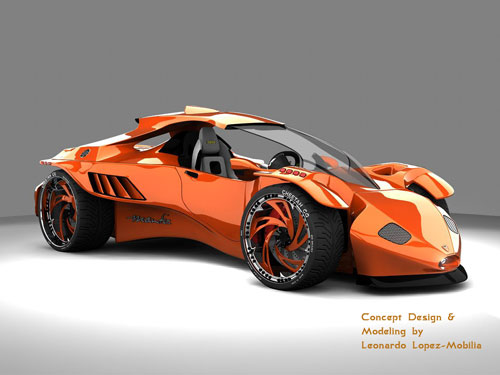
From 3D Model to Concept Car


Before products are introduced to the public, the product developers often make a 3D model so that they can see how the concept will appear when finished. These cell phone manufacturers, toy makers, and vehicle designers use these small-scale replicas of the concept to study before the actual object goes into production.
There are many ways to create a 3D model. These include using mathematical equations, pen and pencil, or through the use of a computer. Game creators started using these images to develop their products before computers started recording and using real time to create these new images. These early designers called their images "sprites".
Not only are 3D models used in the video game industry, but also in industrial fields for research. These models include the body part models for the medical industry, the science community's chemical compound models, and building, landscape, and automobile models for architects and engineers. There has also been a recent introduction of a 3D model with geographical features to the science community.
The 3D model is usually created in two different forms, the solid model and the boundary model. If you are creating a solid model you are trying to show the actual size and shape of the object. These are the types that are used mostly in the medical and engineering fields; therefore, the hardest to make. If you are making a boundary model you are trying to show the surface of the object only. These are easier to construct and are usually done by using computer graphics. The media and art fields usually use these kinds of 3D models.
In the United States one of the most common ways that the 3D model is used is in the making of an automobile. Each new car concept starts with a sketch and later becomes hard drawings. These drawings get colored in all the right places and tweaked so that the engineers can then create the design. These designs are later made into a small-scale 3D model so that all the important parts can be pieced together to form the new vehicle.
When the vehicle designers use 3D models they can insert all the different trim package and color options. Then they take the concept vehicle on a virtual "test drive" to see how it works in all possible driving situations. After it has been tested, the vehicle is ready to go to production on the assembly line, then to the dealership where potential owners can buy their new dream car. Because of the many roles that 3D models play, their development plays a major factor in our lives from day to day.


Article Source: http://EzineArticles.com/6825824