Wednesday, May 25, 2011

How To Set Up Mobile TV Streaming


Mobile phone technology is growing year upon year. Many new mobile designs, namely smart phones, allow Internet access through WiFi or 3G connections, video streaming, and even mobile TV streaming. It may require an additional subscription to a mobile streaming provider but there are free to air channels available too. Even terrestrial TV is available to stream and store on a mobile phone to watch at your convenience.
History of Mobile TV Streaming
The MTV-1 or Microvision was the first mobile TV and designed by inventor Clive Sinclair, who sold his first product to the product. It included a 2-inch CRT screen and was able to pick up a TV signal in numerous countries. The Harvard Business Review discovered that mobile TV streaming increased 564 percent amongst smart phone users during the 2010 Vancouver Olympics.
How To Set up Mobile Streaming
Mobile broadband now has the capacity to stream live TV to a phone. Web based services include TV Catchup, but if you would like access to a Freeview, Satellite, or Cable channel it is possible to stream a signal to your mobile phone through use of a computer and digital TV tuner. However, the downside to mobile streaming is the data usage. If you have unlimited Internet access, this will pose no problem, but many mobile phone providers may request their customers follow a fair use policy.
1. Download one of several software programmes which allows you to stream TV on a mobile. Most of these can be installed on Mac, Linux, and Windows free of charge.
2. After the streaming software has downloaded, open the set up file by double clicking and follow the wizard without altering the default settings.
3. The next step is to configure the streaming software by choosing Media Manager. If Internet Explorer is incompatible with the software it can be made compatible through Google Chrome Frame.
4. Once the software is installed on your computer, you can then add TV episodes and movies to each library. If you have a large number of media files, set up several libraries to keep them in order and provide easier access when you want to stream.
5. To access media content on your smart phone or mobile you may have to open an account with your chosen software provider. This is often free of charge and will provide simple instructions on how to download. Click preferences in the media manager, click the necessary tab, and sign in to your account. Finally, click on publish to your streaming server and it should allow instant contact to your files.
6. Accessing your movie and TV programmes via your media content requires you to launch the streaming software. If you managed to connect it to your smart phone without problems, your streaming software should automatically connect to your server.
7. Whenever your computer is connected to the streaming software, you will be able to access your media files while also searching for music, photos, and movies via the Internet.


Thursday, May 19, 2011

Personal Supercomputer


The computing standards of the 21st Century look quite differently than they did when the concept was first thought up in the mid to late 20th Century. Before access to the power that a supercomputer brings was limited. But today, with the introduction of many different web based applications and cutting edge technology advancements, anyone can have their own supercomputer. In fact, some carry it around with them in a laptop or tablet while others stick to the tried and true desktop formula. Virtually everyone can have their own personal supercomputer depending on the equipment they have, the web applications in which they place their trust, and the uses that they subscribe to.
In the old days, supercomputers were reserved for predicting the weather and other such frontline usages that one needed special training and a whole lot of money for to operate. But today, any tablet or computer can provide the same functions. Think about applications, such as Google Earth, MapQuest, or The Weather Channel. These are available at a relatively low cost to users, who choose to include them on their tablets, phones, and other forms of technology. Portable, mobile applications have transformed the industry to where it is accessible to everyone, and not just a small group.
In order to take the most advantage of this, you really need a hosting provider, who can deliver to you the same kind of accessibility, whether you have a WiFi connection or not. Many have started to explore 3G and 4G options that are capable of delivering up to date information and data without any kind of routing hardware necessary at a premises. Satellite technology has worked in corroboration with companies like Apple, Google, and Amazon, to deliver one of the most advanced world experiences out there. What once was determined "unique" is now quickly becoming the norm.
Your own personal supercomputer can be as mobile and stationary as you want it to be, and that kind of access makes you a more well informed person. Your entire life doesn't have to function at the mercy of location or an on and off switch. You can be constantly plugged in, and this can lead to not just a better handle on information, but also more success and closer connections to friends and family that you may have previously forgotten about.
The world of today can be one that makes you more involved if you know how best to put your personal supercomputer to use. Revel in today's technology by placing your trust in a hosting provider that gives you options and devotes itself to constant uptime, so you never again have to find yourself drifting aimlessly in the dark through the modern world.

Sunday, May 15, 2011

Reviewing Canon MP258 Printer and Toner


The Canon Mp258 has the ability to print scan and copy all your office printing needs. Canon has come up with the newest designs and the most innovative features of all to match all your expectations from a quality product to bring into your office.

You can print at a standard print at high speeds with 4800 x 1200 dpi resolution for beautiful professional grade photos in no time. You can have the first borderless photo in 56 seconds and it will come out looking as if you had it professionally ordered from a photo lab.
Just because this printer takes care of all your photo needs, doesn't mean it can't do regular documents. Documents will come out looking pitch black and saturated where the words are sharp and crisp. You will have the best looking documents around and you will be seen as more professional than you thought you had the option to be from this printer.
The prints if taken care of properly can last up to 300 years whether they are photographs or word documents. The inks are made of such high quality long-lasting ingredients that they are absorbed permanently into the paper and cling tightly. Everything will stay sharp and crisp and smudge free.
The scanning resolution is 600 x 1200 dpi and allow for a 48 bit input and 24 bit output scanning bit depth. The auto scan mode will allow for automation of scanning and saving procedures in three steps that are very short.
If one color goes out in the toner that doesn't mean that they all have to go out. You can have one cartridge replaced while finishing off your other colors. This way you get the most for your money and reserve resources at the same time.
The copy speed allows for identical reproduction of second generation photos and documents with its dual color gamut processing technology. The opening output tray keeps your paper from jamming when it is closed and the quick start allows you to begin operations almost instantly a few seconds after turning the power on so you don't have to wait for it to warm up.
Canon has set each of their models up with an abundance of features so you will not run out of options. Everything you need is either provided in this machine or is available for upgrade. With the Canon Mp258 you will always have options and you will be covered.


Article Source: http://EzineArticles.com/6826271

Thursday, May 5, 2011

Canon MP830 Printer and Toner Review Info


The Canon Mp830 is an all in one printer which allows you to print copy and scan. Each feature is user-friendly and is suitable to multitask. Also the small size of the unit makes it perfect for an at-home office or even a smaller or medium sized business. If you are looking to save space or you have limited space to spare this is the model to buy for that. The nice design is small and compact as well as enhances the professional look of your office.
The list of features keeps going. One feature it has is the ability to scan a two sided document page which flaunts its advanced technology in automatic document feeding.
This printer is capable of printing at high speeds of 30 pages per minute while retaining the quality of the print. If you compare the print quality to the print quality of other devices of the same caliber, this one will win hands down. If you are looking for photo quality, this is the printer to choose. Its application is widened to be used by semi-professional photographers even. The resolution is 9600 x 2400 dots per inch which cannot be paralleled by any other company's device.
Of course it is an all-in-one printer which allows it to receive faxes. The technology it possesses enables the printer to save 100 speed dials and 250 faxes that are incoming. This allows the printer to get faxes up to 250 even if it isn't printing. If the cartridge is low or malfunctioned it will hold the fax in the memory and print it when it comes out.
You can also print on many different paper types. The Mp830 can hold up to 300 sheets of paper in the trays at one time. It can scan colored and black and white documents and photographs which utilizes its optical lens. This particular device is commonly used as a scanner for photos which can be printed with such amazing clarity.
This is a versatile machine and can handle printing almost all the same printing tasks in your office as any other printer but can do it better. This piece of equipment is worthy of any office and will be money well spent. It will guarantee you high quality service and flexibility. Not only will you be impressed with the features, quality and abilities but the price will impress you as well. This Canon model is said to be perfect by many users.


Article Source: http://EzineArticles.com/6826276

Sunday, May 1, 2011

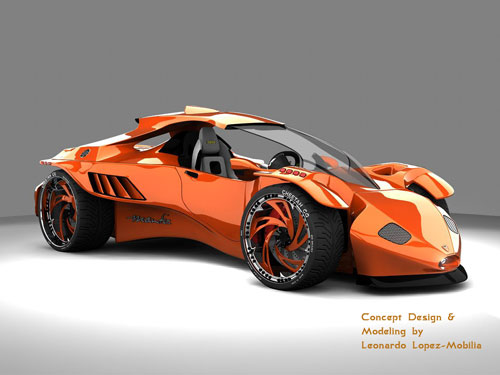
From 3D Model to Concept Car


Before products are introduced to the public, the product developers often make a 3D model so that they can see how the concept will appear when finished. These cell phone manufacturers, toy makers, and vehicle designers use these small-scale replicas of the concept to study before the actual object goes into production.
There are many ways to create a 3D model. These include using mathematical equations, pen and pencil, or through the use of a computer. Game creators started using these images to develop their products before computers started recording and using real time to create these new images. These early designers called their images "sprites".
Not only are 3D models used in the video game industry, but also in industrial fields for research. These models include the body part models for the medical industry, the science community's chemical compound models, and building, landscape, and automobile models for architects and engineers. There has also been a recent introduction of a 3D model with geographical features to the science community.
The 3D model is usually created in two different forms, the solid model and the boundary model. If you are creating a solid model you are trying to show the actual size and shape of the object. These are the types that are used mostly in the medical and engineering fields; therefore, the hardest to make. If you are making a boundary model you are trying to show the surface of the object only. These are easier to construct and are usually done by using computer graphics. The media and art fields usually use these kinds of 3D models.
In the United States one of the most common ways that the 3D model is used is in the making of an automobile. Each new car concept starts with a sketch and later becomes hard drawings. These drawings get colored in all the right places and tweaked so that the engineers can then create the design. These designs are later made into a small-scale 3D model so that all the important parts can be pieced together to form the new vehicle.
When the vehicle designers use 3D models they can insert all the different trim package and color options. Then they take the concept vehicle on a virtual "test drive" to see how it works in all possible driving situations. After it has been tested, the vehicle is ready to go to production on the assembly line, then to the dealership where potential owners can buy their new dream car. Because of the many roles that 3D models play, their development plays a major factor in our lives from day to day.


Article Source: http://EzineArticles.com/6825824